Wednesday, December 14, 2011

Create Google+ Page for Your Blogger/Website

Google+ is a great source for promote your Website/Blog just create and place your Google+ Page on your Blogs.


Start to create Google+ button :


1. Log-in to Google+


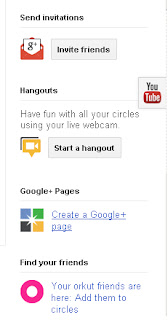
2. After Log-in see at the Right side in the botton of your Google+,see below and Just click on Create a Google+ page Icon 


  .

3. Pick a Category Product or Brand.


4. Fill all the information Like Website Title and URL of your Website/Blog.

5. Select I agree to the page term.

6. Push the Create Button now.

7. Just give the tagline upto 10 words which will describe your Website/Blogger.

8. Photo can be upload as per your choice.

9. Click Continue.

10. Share as per you required.

11.Finish.


Post the code at your Website/Blogger Page.

Thank You

Tuesday, December 13, 2011

Submit a Site for Alltop

Suggest a Site for Alltop


To submit a site, you must be logged in. Please log in or create an account.

created your account first than click the submission link ? Go to the submission form.

As You click on creat an account there will be a window will open with black color on the top just fill up the little information like Email address user name and password than open your mail account for accept the  confirmation mail from Alltop.


 Now the turn to submit your blog/website URL to Alltop Click on the link 


A Submission form will come on your browser see below just fill all the requirement as the Alltop needed.


1. AllTop Topic :  you just think what type of content you have upload over your blogs/Website like you have creat a blogs for the Parts of bikes and cars so the Alltop Topic should be Automobile another one information about the jobs than the topic should be career or Employment.   

2. Site/Blog Name : Enter your website or blog Title name .

3. Site/Blog URL : Write your Website/Blog URL.

4. RSS Feed Address :   Write your Feed URL you can get feed URL from Feedburner.


5. Site/blog owner’s name : The owner/admin name.


6. Owner’s Email Address : Write the personal email address of the site owner here. AllTop will use this to contact the owner regarding the submission.


7. Comments : Type something about  your submission, Up-to 250 characters.


In the last Click the Submit button.Alltop team will review your submission and if you are accepted then you will be informed via email in 4 – 5 days.

Monday, December 12, 2011

Add a Table to Blogger Posts

How to creat a table for your blogger there is i just show you an example, A table with a header and 5 columns,5 row you can change your table color itself and also decrease and increase column and row as per your choice.the table will look like.


Table Header Table Header Table Header Table Header Table Header
Table Cell Table Cell Table Cell Table Cell Table Cell


Log in to your blogger

Click on new post

In your right side click on the Edit HTML tab.

You copy the below code and paste the code inside your post.

<style type="text/css">.nobrtable br { display: none }</style>
<div class="nobrtable">
<table border="2" bordercolor="#3366cc" cellpadding="3" cellspacing="3" style="background-color: white;"><tbody>
<tr style="background-color: #3366cc; color: white; padding-bottom: 4px; padding-top: 5px;"> <th>Table Header</th>
<th>Table Header</th>
</tr>
<tr>
<td>Table Cell</td>
<td>Table Cell</td>
<td>Table Cell</td>
<td>Table Cell</td>
<td>Table Cell</td>
</tr>
<tr>
<td>Table Cell</td>
<td>Table Cell</td>
<td>Table Cell</td>
<td>Table Cell</td>
<td>Table Cell</td>
</tr>
<tr>
<td>Table Cell</td>
<td>Table Cell</td>
<td>Table Cell</td>
<td>Table Cell</td>
<td>Table Cell</td>
</tr>
<tr>
<td>Table Cell</td>
<td>Table Cell</td>
<td>Table Cell</td>
<td>Table Cell</td>
<td>Table Cell</td>
</tr>
<tr>
<td>Table Cell</td>
<td>Table Cell</td>
<td>Table Cell</td>
<td>Table Cell</td>
<td>Table Cell</td>
</tr>
</tbody></table>
</div>
</div>
</div>


Change your table color and inside text color make chage these below code as per your choice.

<table border="2" bordercolor="#3366cc" cellpadding="3" cellspacing="3" style="background-color: white;"><tbody>
<tr style="background-color: #3366cc; color: white; padding-bottom: 4px; padding-top: 5px;">


Thursday, August 11, 2011

Drop Down Menu Widget For Blogger

Drop Down Menu looks very attractive and also merge many function in a single window if you need to creat a Drop Down Menu for your blogs just follow these simple step and make yourself happy by heart.


Log in to Blogger, go to "Design" section, then click on "Page Element", than Add Gadget and select it as "HTML/JavaScript"


Put this code:


<form><select name="menu" onchange="window.open(this.options[this.selectedIndex].value,'_blank')"
size=1 name=menu>

<option />- Google -

<!-- change the links with your own -->
<option value="http://yourlink.com" />Title One
<option value="http://yourlink.com" />Title second
<option value="http://yourlink.com" />Title Third
<option value="http://bloggerhelped.blogspot.com/" />Blogger Widgets
</select></form>


Now Change your link and Title what ever you want enjoy.


Thank You

Get Approved For Google Adsense Fast

Earning good amount of wealth every blogger surfer think but it can be true if they invest their little time their mind and really want to make money so expose their quality to Adsense team so they must get approval through Adsense.

Real Names and information.

As the blogger goes for apply to the adsense it ask for registration so i suggest you must fill up your real information like your name your real information address and ph.no etc. 

Apply One time

If you have applied for adsens must be remember never applied again till you get the reply mail from adsense if your blogger select than you will get a confirmation mail otherwise they send a rejection mail to you.only ther rejected blogger can apply again.


Blog Has Good Content 

There should be a good content  in your blog so check yous blogger quality and quantity both are must be pure and also post your content at the daily basis like 3-5 post per day.

Good Traffic

The traffic should be hit at your blogs as many traffic increase to your blog that will be good for you to get approval fast so always submit your blog/website as many directory website like Google,Yahoo,Bing,Ask etc.you can also submit yur blogs  to many articles website.

Make Your Site Look Professional

A blog must be professional for making your blog professional follow these few step surely these step helps to you.
 
  1. Use light colors.
  2. Upload simple Template.
  3. Add links to all your important pages.
  4. Ensure easy navigation.
Be remember this tips for getting fast approval.

 Thank You.